
Programming instructions

OPERATION & CALIBRATION
1-37
BLODGETT IQT CONTROL
4
2
3
7
5
8
10
11
12
13
14
1
9
16
6
15
17
18
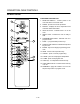
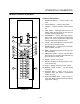
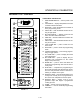
FIGURE 17
COMPONENT DESCRIPTION
1. OVEN POWER SWITCH - controls power to the
oven.
2. TOP DISPLAY - displays temperature and other
controller related information.
3. PROG LED - when lit indicates the controller is
in the programming mode.
4. FAN HI LED - when lit indicates the fans are runĆ
ning at high speed.
5. BOTTOM DISPLAY - displays cook time and
other controller related information.
6. HEAT LED - when lit indicates the control is callĆ
ing for heat.
7. FAN LO LED - when lit indicates the fans are runĆ
ning at low speed.
8. COOL DOWN KEY - press to enter the cool
down mode.
9. PROG KEY - press to enter the programming
mode.
10. TOGGLE/CLEAR KEY - press during programĆ
ming to toggle options.
11. ACT TEMP KEY - press to display the actual
oven temperature.
12. SET TEMP KEY - press to display the proĆ
grammed cook temperature for the current
stage of the product key.
13. ENTER KEY - press to enter new values into
product key programming. Also used to view reĆ
covery time.
14. SCAN KEY - completes the programming for
the current parameter and advances the controlĆ
ler to the next parameter. Press to view time reĆ
maining on multiple cook cycles.
15. PRODUCT LEDS - when lit indicate which prodĆ
uct keys are currently in use or programmed for
the current oven temperature and fan speed.
16. PRODUCT KEYS - assigns a key to a proĆ
grammed recipe and begins a programmed
cooking process.
17. FUSES - Provide oven circuit protection.
18. COMPORT - used to download programming
information.