
Programming instructions
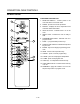
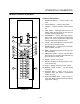
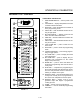

CONVECTION OVEN CONTROLS
1-36
2ND LEVEL PROGRAMMING
Computers with ON/OFF key in control
1. Place the control in OFF mode.
2. Press the CLEAR key.
3. Press the B, A, K, and E keys followed by the
PROG/ENTER key.
4. The display reads ACCESS.
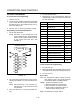
5. Input the relevant code from TABLE 2.
6. Press the PROG/ENTER key.
7. Press CLEAR CLEAR CLEAR to exit.
Computers without ON/OFF key
1. Place the control in SELECT mode.
2. Press the 1, 2, 3, 4, 5, 6 keys follows by the
PROG/ENTER key.
3. The display reads ACCESS.
4. Input the relevant code from TABLE 2.
5. Press the PROG/ENTER key.
6. Press CLEAR CLEAR CLEAR to exit.
ALL CONTROLS
Temperature display scale
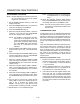
1. The display flashes _F/_C then MODE-?
2. Press any key to toggle the scale from _F to _C.
3. Press the PROG/ENTER key to lock in new scale.
4. The display flashes T'_F ( or T'_C).
Ready Band
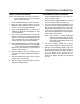
1. The display flashes READY, BAND and POS.
2. Use the numeric keys to enter a value between
1 and 25. Press the PROG/ENTER key.
3. The display flashes READY, BAND and NEG.
4. Use the numeric keys to enter a value between
1 and 25. Press the PROG/ENTER key.
To exit oven calibration
1. The display flashes ACCESS, DONE and EXIT.
2. Press CLEAR, CLEAR, CLEAR.
3. The display flashes REBOOT and SELECT.
Access Codes
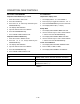
123 Display model, version, date and checksum of firmware
000 STD unit test
CLEAR, TEMP, TEMP, TEMP, PROG/ENTER Temperature offset (+/-)
Ready band offset (+/-)
TABLE 2