
Programming instructions

OPERATION & CALIBRATION
1-35
MANUAL COOKING PROCEDURE
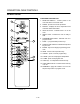
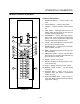
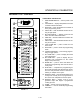
NOTE: Use the shelf keys (15) to enter a numeric valĆ
ue. Use product keys (14) P for the numeral
9 and O for the numeral 0.
1. Set the POWER ON switch (1) to the ON position.
2. When the control displays SELECT press the
MANUAL/COOK & HOLD key (13) to enter manuĆ
al āmode. The control displays MANUAL.
3. Press the PROG/ENTER key (5) and thenā theā
TEMP key (8). When the control displays _F enter
a cook temperature.
4. If the oven's actual temperature is less than the
defined temperature, the control displays WAIT
LOW. The control displays WAIT āHIGH āwhile ātheā
oven ācools ādownā if ātheā oven's actual āātemperatureāā
is āāhigher āāthanāā theāā programmed temperature.
5. Press PROG/ENTER key (5) and thenā the TIME/
COOL DOWN key (9). When the control displays
_ā_ā_ā__ enterā a ācookā time.ā Pressā the āPROG/ENTER
key (5). āThe control will begin to count down and
start the cooking process.
6. Press the TEMP key (8) once to display the set
point and press it again to display the actual temĆ
perature.
7. Press the CLEAR key (6) twice to return to select
mode from the manual mode.
8. With the controller displaying SELECT press the
TIME/COOL DOWN (9) key.
PROGRAMMED COOKING PROCEDURE
1. Press the POWER ON/OFF key (7) to set the conĆ
troller to the select state.
2. With the controller displaying SELECT, press the
desired PRODUCT KEY A through P (14).
3. The ācontrol ādisplays āWAITā LOWā while the āoven
heats up if the oven's actual temperature is lower
than the programmed temperature. The control
displays WAIT āHIGH āwhile ātheā oven ācools ādownā
if ātheā oven's actual āātemperatureāā is āāhigher āāthanāā
theāā programmed temperature. Press the desired
product key to start the timer.
NOTE: If the product is a single stage/single
shelf item, the shelf timer may be used by
pressing the appropriate shelf number. If
the product is batch loaded, the timer will
start automatically.
4. The control displays DONE and a buzzer
sounds. Press CLEAR (6) to silence the buzzer.
5. With the control displaying SELECT press the
RECIPE key. When the control displays PRODĆ?
press the desired PRODUCT KEY A through P
(14). The display cycles through the proĆ
grammed settings for the selected product. To
advance the display manually press the SCAN
key (12).