
Programming instructions
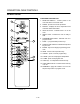
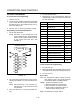
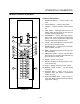
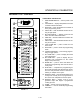

CONVECTION OVEN CONTROLS
1-34
PROGRAMMING PROCEDURE
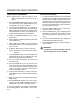
NOTE: Use the shelf keys (15) to enter a numeric valĆ
ue. Use product keys (14) P for the numeral
9 and O for the numeral 0.
1. Set the POWER ON/OFF switch (1) to ON. The
display reads OFF.
2. Press the POWER ON/OFF key (7) to power the
controller. The display reads SELECT.
3. Press the PROG/ENTER key (5).
4. When the controller displays CODE-? enter the
manager's code and press the PROG/ENTER
key (5). The display reads -PROM-?.
NOTE: The manager's code prevents unauthoĆ
rized entry to the program mode. The
code must be entered to access the proĆ
gram mode. The factory default managĆ
er's code is BAKE. Keep a copy of the deĆ
fault code in a safe place for future
reference.
5. When the display reads PROGĆ? press one of the
product keys A thru P (14). The selected lamp
lights.
6. When the display reads PRHEAT TEMPĆ? enter a
numeric temperature. Press the PROG/ENTER
key (5) to advance the controller.
7. When the controller displays CURVEĆ? COMP
enter a two digit compensation curve. Press the
PROG/ENTER key (5) to advance the controller.
(Values 0 to15).
8. When the controller displays TEMPĆ? STAGE 1
enter a cook temperature for the selected prodĆ
uct. Press the PROG/ENTER key (5) to advance
the controller.
9. When the controller displays TIMEĆ? STAGE enĆ
ter a cook time for the selected product. Press
the PROG/ENTER key (5) to advance the controlĆ
ler.
10. Use any key to cycle the fan speed through
HIGH, LOW, or OFF for the selected product. If
high or low is selected the display reads
MODEĆ?. Use any key to cycle the fan mode
through CONT (continuous), CYCLE, or PULSE.
11. Repeat āsteps 8-10 forā additional stages.
NOTE: If additional stages are not required, enĆ
ter temperature of 0_ to end programĆ
ming.
12. When the controller displays SAVE PRODĆ?
press the PROG/ENTER key (5) to save the prodĆ
uct settings and return to the SELECT state.
NOTE: The oven will not preheat unless a program
is activated or a temperature has been set in
manual mode.
COMPENSATION CURVE
Compensation curves are mathematical algorithms
that adjust the rate of the countdown timer to comĆ
pensate for variations in oven temperature above or
below that of the setpoint temperature. CompensaĆ
tion curves offset time for variable conditions that efĆ
fect the oven temperature allowing for consistent reĆ
sults.
If the oven temperature is below the setpoint the conĆ
trol slows the speed of the countdown, so that the
time to elapse 1 second on the computer is longer
than an actual second. If the oven temperature is
above the setpoint temperature the control increases
the speed of the countdown, so that the time to
elapse 1 second on the computer is shorter than an
actual second.
Choosing a compensation curve
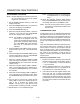
1. Develop a recipe for a specific product using the
minimum load size and a compensation curve of
0. (i.e., no compensation, 1 second countdown
= 1 second actual)
2. Use the maximum load size for your product. EnĆ
ter a compensation curve of 7. Compare the reĆ
sults with those of a minimum load size.
3. If the maximum load size is lighter than the miniĆ
mum load size, use a higher compensation
curve value and retry. If the maximum load size
is darker than the minimum load size, use a lower
compensation curve value and retry. Repeat until
the results of the maximum load match the miniĆ
mum load.