
Programming instructions

OPERATION & CALIBRATION
1-33
INTELLITOUCH II CONTROL
2
1
3
5
6
7
8
11
10
13
12
15
4
14
9
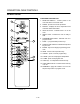
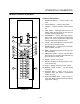
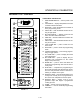
FIGURE 16
CONTROL DESCRIPTION
1. POWER ON SWITCH - controls power to the
oven.
2. LIGHTS SWITCH - controls interior lights.
3. DISPLAY - displays controller related informaĆ
tion.
4. HEAT LIGHT - illuminates when the oven is
heating. When the light goes out, the oven has
reached operating temperature.
5. PROG/ENTER - used to select the programĆ
ming mode, cycles through the programming
options and stores programmed values into
memory. Starts timer in manual mode.
6. CLEAR - clears the selected mode and resets
the controller to the select mode.
7. POWER ON/OFF - controls power to the IntelliĆ
touch computer controller.
8. TEMP - displays the set point and the oven's acĆ
tual temperature.
9. TIME/COOL DOWN - sets the cook time when
the controller is in manual mode. Starts the cool
down fan when in select mode.
10. PAUSE - pauses a cook cycle.
11. RECIPE - displays ā theā recipeā programā forā a seĆ
lected product key.
12. SCAN - displays the active product recipes.
13. MANUAL/ COOK & HOLD - sets the manual
cook mode.
14. PRODUCT KEYS - assigns a key to a proĆ
grammed recipe and begins a programmed
cooking process.
15. SHELF/PROGRAM KEYS - used āto āenter ānuĆ
meric āādata during programming and shelf during
single stage cooking.