
Programming instructions
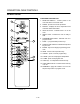

CONVECTION OVEN CONTROLS
1-30
INTELLITOUCH
1
3
4
6
7
14
5
8
10
11
12
13
15
2
9
16
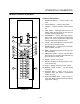
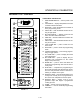
FIGURE 14
COMPONENT DESCRIPTION
1. SELECTOR SWITCH Ć controls power to the
oven and selects cool down mode.
2. FUSES Ć provide oven circuit protection
3. DISPLAY Ć displays the time, temperature and
controller related information.
4. HEAT ON LIGHT Ć indicates heat is on in the
oven.
5. READY LIGHT Ć indicates the oven is ready to
load.
6. PROGRAM MODE LIGHT Ć indicates oven is in
program mode.
7. PROD Ć 7 programmable product keys.
8. PRODUCT KEY LIGHTS Ć indicate which product
key is in use.
9. ENTER Ć key used to begin programming proceĆ
dure.
10. TEMP Ć actual oven temperature key.
11. CANCEL Ć press to cancel programming.
12. R TEMP Ć press to recallĂprogramĂtemperature.
13. R TIME Ć press recall program time.
14. LOAD keys Ć 5 independent load timer keys.
15. LOAD TIMER LIGHTS Ć indicate which load key
is in use.
16. NUMERALS Ć apply the numbers 1 thru 0 to the
adjacent keys when in program mode.