
Programming instructions

OPERATION & CALIBRATION
1-27
COOK OPERATION
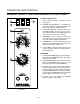
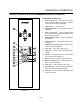
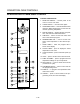
1. Rotate the TEMPERATURE dial (6) to the desired
cooking temperature from 150Ć500_F
(66Ć260_C). Turn the dial clockwise to increase
the temperature, counterĆclockwise to decrease.
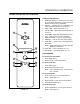
2. Press the COOK HI/LO FAN key (9) until the disĆ
play (4) reads HIFAN. Press the key again to seĆ
lect the low speed fan. The display reads LOFAN.
3. Press the FAN CON/CYC key (12) until the disĆ
play reads FAN CON. Press the key again for
cycling fan operation. The display reads FAN
CYC. The fan cycles on and off in 30 second interĆ
vals at the speed selected with the COOK HI/LO
FAN (9) key.
4. Rotate the TIME (5) dial to the desired cook time
from 5 seconds to 12 hours. Turn the dial clockĆ
wise to increase the cook time, counterĆclockĆ
wise to decrease. When the time digits and the
colon blink in the display, the cook cycle has
been set but not started.
5. When the display reads the set temperature press
the START TIMER key (7) to start the cook cycle.
The time can be changed at any point during a timĆ
ing cycle by rotating the TIME dial (5) clockwise or
counterĆclockwise. To cancel the countdown press
the CANCEL key (15).
NOTE: To display the temperature within the
oven, press and hold the ACTUAL TEMP
key (8).
6. When the timer has counted down to 0, press the
CANCEL key (15) to silence the alarm.
MANUAL COOK AND HOLD OPERATION
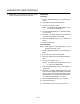
1. Rotate the TEMPERATURE dial (6) to the desired
cook temperature from 150Ć500_F (66Ć260_C).
Turn the dial clockwise to increase the temperaĆ
ture, counterĆclockwise to decrease.
2. Press the COOK HI/LO FAN key (9). The display
reads HIFAN. Press the key again to select the
low fan speed. The display reads LOFAN.
3. Rotate the TIME dial (5) to the desired cook time.
Turn the dial clockwise to increase the time,
counterĆclockwise to decrease.
4. Press the HOLD key (10). The display reads
HOLD. Rotate the TEMPERATURE dial (6) to set
the desired hold temperature.
5. Press the FAN CON/CYC key (12) to set the fan
mode. If cycling fan is selected the CYC key reĆ
mains lit.
NOTE: When FAN/CYC is selected in the hold
mode the fan cycles on and off with the
heating elements.
6. When the oven reaches the set temperature,
press the START TIMER key (7) to start the cook
cycle. The display flashes the fan speed then
counts down the cook time. The hold key blinks
until the cook time expires.
7. As the oven enters the hold mode the hold key
remains lit. The timer begins counting up to indiĆ
cate elapsed time. If cycling fan is selected the
fan cycles on and off at low speed.
NOTE: If the desired hold temperature is lower
than the actual oven temperature, the fan
shuts off. The temperature digits blink
until the oven temperature drops to the
desired hold temperature.
8. To display the temperature within the oven, press
and hold the ACTUAL TEMP key (8).
NOTE: Press the CANCEL key (15) at any time to
cancel the current cycle.
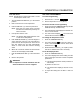
WARNING!!
A complete five minute shutdown must be
observed before the oven is relighted.