
Programming instructions
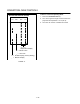
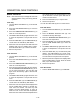
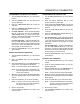
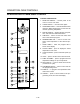

CONVECTION OVEN CONTROLS
1-26
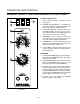
INTELLIPLUS WITH CHAIN EVENT CONTROL
1
2
3
4
5 6
7
8
9
10 11
12
13
14
15
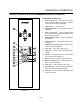
FIGURE 13
CONTROL DESCRIPTION
1. SELECTOR SWITCH - controls power to the
oven for cook or cool down.
2. LIGHTS SWITCH - controls interior lights.
3. OVEN READY LIGHT - when lit indicates burner
operation. When the light goes out the oven has
reached operating temperature.
4. DIGITAL DISPLAY - displays the time, temperaĆ
ture, and controller related information.
5. TIME DIAL - used to set the cook and/or hold
time of the selected program.
6. TEMPERATURE DIAL - used to set the cook
and/or hold temperature of the selected proĆ
gram.
7. START TIMER - starts the program that is
shown in the display.
8. ACTUAL TEMP - press to display the actual
temperature of the oven.
9. COOK HI/LO FAN - press to select fan speed, (hi
or lo).
10. HOLD - press to set the oven in the hold mode.
11. PGM1 thru PGM5 - press to program time and
temperature settings for up to five products.
12. FAN CON/CYC - press to select the fan mode
(continuous or cycle).
13. PGM MODE ON/OFF - press to enter and exit
the programming mode.
14. EVENT # - to program event parameters with
chain event control.
15. CANCEL - press to cancel entries in the proĆ
gramming mode, and clear the display.