
Programming instructions
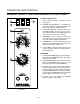
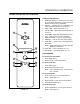
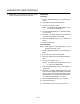
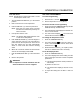
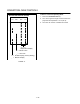
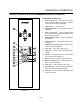
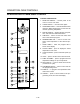

CONVECTION OVEN CONTROLS
1-24
MANUAL OPERATION
NOTE: Press the arrow keys to change the cook time
and temperature at any point during manual
operation.
Cook Only:
1. Turn the SELECTOR SWITCH (1) to the desired
position.
2. Press the TIME ARROW KEYS (3) to enter the
cook time.
3. Press the TEMPERATURE ARROW KEYS (7) to
enter the cook temperature.
4. The READY INDICATOR (4) lights when the oven
is at the set temperature. Load product into the
oven.
5. Press the START KEY (13). The TIME DISPLAY (2)
counts down. The manual key LED flashes.
6. When the cook time expires the LEDs and both
displays flash and an audible alarm sounds.
Press the STOP KEY (15) to silence the alarm.
7. Remove the product.
Cook with Hold:
1. Turn the SELECTOR SWITCH (1) to the desired
position.
2. Press the TIME ARROW KEYS (3) to enter the
cook time.
3. Press the TEMPERATURE ARROW KEYS (7) to
enter the cook temperature.
4. Press and hold the HOLD KEY (8) then release.
Use the TEMPERATURE ARROW KEYS (7) to enĆ
ter the hold temperature. The hold key LED
lights. Press the hold key again to exit the hold
program.
5. The READY INDICATOR (4) lights when the oven
is at the set temperature. Load product into the
oven.
6. Press the START KEY (13). The TIME DISPLAY (2)
counts down. The manual key LED flashes.
7. When the cook time expires both displays flash
and an audible alarm sounds for several secĆ
onds then self cancels. The hold key LED
flashes. The time display begins to count up
while the oven cools to the hold temperature.
When the oven reaches the hold temperature the
time display resets to 00:00 then begins to count
up the hold time. The fan cycles with heat deĆ
mand in the hold mode.
8. Press the STOP KEY (15) to stop the timer.
9. Remove the product.
10. Push the HOLD KEY (8) to turn off hold mode.
Cook with Pulse:
1. Turn the SELECTOR SWITCH (1) to the desired
position.
2. Press the MANUAL PRODUCT KEY (12). The
manual and fan key LEDs light.
3. Press the TEMPERATURE ARROW KEYS (7) to
enter the cook temperature.
4. Press the FAN KEY (10). The fan key LED flashes.
Use the TIME ARROW KEYS (3) to enter the
pulse time.
5. The READY INDICATOR (4) lights when the oven
is at the set temperature. Load product into the
oven.
6. Press the START KEY (13). The manual key LED
flashes. The TIME DISPLAY (2) counts down.
The fan cycles on for 30 seconds then off for 30
seconds until the set pulse time has expired.
7. When the pulse time expires both displays flash
and an audible alarm sounds. Press the STOP
KEY (15) to silence the alarm.
8. Remove the product.
Oven Shut Down:
1. Turn the SELECTOR SWITCH (1) to OVEN OFF.