
Programming instructions

OPERATION & CALIBRATION
1-23
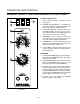
CHĆPRO3 (SOLID STATE PROGRAMMABLE DIGITAL CONTROL)
1
15
2
11
3
4
6
5
7
8
9
10
12
13
14
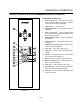
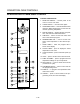
FIGURE 12
COMPONENT DESCRIPTION
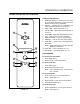
1. SELECTOR SWITCH - turns power to the oven
on or off. Allows selection of cook or cool down
modes and fan speed (if applicable).
2. TIME DISPLAY - gives cook time.
3. TIME ARROW KEYS - press to enter cook and/or
pulse times.
4. READY INDICATOR - when lit indicates the
oven has reached the setpoint temperature and
product may be loaded.
5. TEMPERATURE DISPLAY - gives cook and hold
temperatures.
6. HEAT INDICATOR - when lit indicates the oven
is heating.
7. TEMPERATURE ARROW KEYS - press to enter
cook and hold temperatures.
8. HOLD KEY - turns hold mode on or off.
9. TEMP KEY - press to display actual oven temĆ
perature.
10. FAN KEY - turns pulse mode on or off. The LED
above the fan key is always on.
11. PRODUCT KEYS - three programmable keys.
12. MANUAL PRODUCT KEY - default product key
used for manual operation.
13. START KEY - press to begin a cook cycle.
14. PROGRAM KEY - press to enter programming
mode and save programmed settings.
15. STOP KEY - press to silence audible alarms and
cancel cook cycles.