
Programming instructions
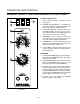
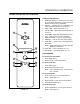
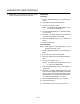
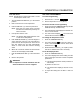
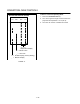
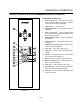
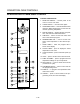

CONVECTION OVEN CONTROLS
1-20
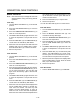
2. Rotate DIAL (6) to enter the pulse time. Pulse
time is a portion of the preĆset cook time.
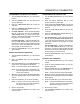
OPERATION
Cook Only:
1. Turn the SELECTOR switch (1) to the desired poĆ
sition.
2. Enter the cook time and temperature.
3. Load product into the oven.
NOTE: The display reads LOAD when the oven
is near the set temperature.
4. Press the START/STOP key (7). The timer begins
to count down.
5. When the cook timer reaches 00:00 the buzzer
sounds and the display reads DONE.
6. Press the START/STOP key (7) to silence the
buzzer.
7. Remove the product.
Cook with Hold:
NOTE: HOLD light is on when hold mode is on and
off when hold mode is off.
1. Turn the SELECTOR switch (1) to the desired poĆ
sition.
2. Enter the cook time and temperature.
3. Press the HOLD key (10). Enter the hold temperĆ
ature.
4. Load product into the oven.
NOTE: The display reads LOAD when the oven
is near the set temperature.
5. Push the START/STOP (7) key. Timer begins to
count down.
6. When the cook timer reaches 00:00 the buzzer
sounds and the display reads DONE. The buzzer
turns off after a few seconds. The display reads
HOLD until the oven reaches the hold temperaĆ
ture. Then the timer begins to count up.
7. Push the START/STOP key (7) to stop timer.
8. Remove the product.
9. Push HOLD (10) key to turn off hold mode.