
Programming instructions

OPERATION & CALIBRATION
1-17
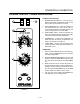
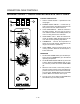
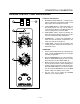
ZEPHAIRE CONTROL - DUAL SPEED BLOWER
BLOWER
HI
OFF
COOL
DOWN
MAN
AUTO
LOW
21
3
4
5
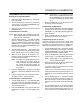
FIGURE 8
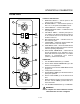
CONTROL DESCRIPTION
1. BLOWER HI/LO/OFF SWITCH - Controls the opĆ
eration of the blower. If the blower switch is in the
OFF position the oven will be turned off.
2. COOL DOWN SWITCH - When the switch is in
the AUTO position, the oven can be used to
cook. When the switch is in the MAN position, the
oven is cooling down for the next bake.
3. OVEN READY LIGHT Ć When lit indicates eleĆ
ments are heating. When the light goes out the
oven has reached operating temperature.
4. THERMOSTAT Ć Controls the temperature at
which the oven will operate. Temperatures can
range from 200Ć500_F (93Ć260_C).
5. COOK TIMER Ć Used to time the length of the
cooking operation. When the set time expires, a
buzzer will sound.
OPERATION
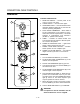
1. Set the COOL DOWN switch (2) to the AUTO poĆ
sition. Turn the THERMOSTAT (4) to the desired
operating temperature.
2. Set the BLOWER SWITCH (1) to the HI position.
When the OVEN READY light (3) goes out, load
the product and set the COOK TIMER (5).
3. When the timer sounds, remove the product. If
the next product requires a lower operating temĆ
perature, then the cool down mode can be used.
Set the BLOWER SWITCH (1) to the LO position.
Turn the COOL DOWN SWITCH (2) to the MAN
position. Make sure that the door is open.
4. Turn the oven off by setting the BLOWER
SWITCH (1) to the OFF position.