
Programming instructions
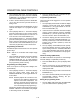
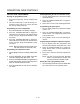
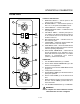
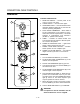
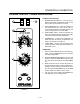
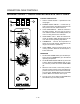
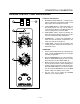

CONVECTION OVEN CONTROLS
1-14
HUMIDAIRE
ON
OFF
OVEN OFF
COOL
DOWN
COOK
LIGHTS
TIMER
SOLID STATE
THERMOSTAT
STEAM
CYCLE START
STEAM ON
STEAM
CYCLE TIME
LIGHT OFF
OVEN READY
1
3
2
4
5
6
7
8
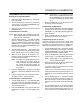
FIGURE 5
CONTROL DESCRIPTION
1. SELECTOR SWITCH - controls power to the
oven for cook or cool down.
2. LIGHTS SWITCH - controls interior lights.
3. OVEN READY LIGHT - when lit indicates burner
operation. When the light goes out, the oven has
reached operating temperature.
4. SOLID STATE THERMOSTAT Ć allows either 8
preĆset temperatures to be selected in accorĆ
dance with customer requirements, or an infinite
selection of temperatures from 200Ć500_F
(95Ć260_C). (infinite control shown)
5. TIMER - activates an electric buzzer that
sounds when the timer expires to alert the operaĆ
tor to remove the product.
6. STEAM ON INDICATOR LIGHT - lights when
steam is being injected into the oven.
7. STEAM CYCLE START BUTTON - activates
steam injection for one complete cycle.
8. STEAM CYCLE TIME SWITCH - sets desired
length of steam cycle from 0 to 30 seconds.
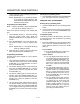
OPERATION
1. Turn the SELECTOR SWITCH (1) to COOK.
2. Set the SOLID STATE THERMOSTAT (4) to the
desired cook temperature.
3. Preheat until OVEN READY light (3) goes out.
4. Load product into the oven. Set the TIMER (5) to
the desired cook time.
5. Set the STEAM CYCLE TIME SWITCH (8) for the
desired length of steam injection.
6. Press STEAM CYCLE START (7). When the temĆ
perature is at or above 225_F (107_C), the soleĆ
noid valve opens. The blue STEAM ON indicator
light (6) comes on. The steam injection cycle
may be repeated as often as desired.
7. When the buzzer sounds, remove the product.
Turn the TIMER (5) to OFF to silence the buzzer.
8. Turn the SELECTOR SWITCH (1) to OVEN OFF.
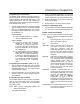
WARNING!!
A complete five minute shutdown must be
observed before the oven is relighted.