
Programming instructions

CONVECTION OVEN CONTROLS
1-12
FACTORY LEVEL PROGRAMMING
Entering the programming mode
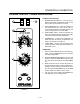
1. Press the program key. The top display reads
CodE.
2. Use the product keys to enter the factory proĆ
gramming accss code: 4 5 2 3. Press the enter
key. The top dislay reads Fact.
Programming the oven configuration
1. Press the SCAN KEY. The display rads Appl.
2. Press the TOGGLE/CLEAR KEY to toggle beĆ
tween electric oven and gas oven. Set the choice
for the oven type. Press the SCAN KEY to enter
the choice.
3. Press the TOGGLE/CLEAR KEY to toggle beĆ
tween half sized or full sized oven. Set the choice
for the oven type. Press the SCAN KEY to enter
the choice.
NOTE: Mark V and DFGĆ100 are full sized ovens.
CTB and DFGĆ50 are half sized ovens.
Programming the temperature offset
1. The top display reads oFF. The bottom display reads
SEt.
2. Press the SCAN KEY. The top display reads oFST.
The bottom display reads either xxF or -xxF.
3. Press the TOGGLE/CLEAR KEY to toggle between
positive and negative. Use the product keys to the
enter the desired temperature offset.
4. Press the SCAN KEY to enter the new temperaĆ
ture offset.
Enabling/Disabling the fan error detection circuit
1. The top display reads FanC. The bottom display
reads YES or NO.
2. Press the TOGGLE/CLEAR KEY to toggle beĆ
tween choices.
3. Press scan to move to next operating parameter.
Programming fan speed option
1. The top display reads FanS. The bottom display
reads 1 or 2.
2. Press the TOGGLE/CLEAR KEY to toggle beĆ
tween choices: 1 for a single speed motor or 2 for
a two speed motor.
3. Press SCAN to move to the next operating paĆ
rameter.
Programming the maximum temperature setpoint
1. The top display reads tELt (temperature limit)
and the bottom display reads either 500 or 550.
2. Press the TOGGLE/CLEAR key to toggle beĆ
tween choices 500_F or 550_F maximum temĆ
perature setting.
3. Press scan to enter the maximum setpoint temĆ
perature.
NOTE: Use 500_F for the DFGĆ100, DFGĆ200,
Mark V, CTB and DFGĆ50. Use 550_F for
the DFGĆ100 XCEL and Mark V XCEL.
Exiting the factory programming mode
1. The top display reads Fact. Press the PROG KEY.
The control returns to the operating mode.