
Programming instructions

OPERATION & CALIBRATION
1-11
Programming the setback mode
The setback mode operates as a power saving feaĆ
ture. After a period of nonĆuse (the setback time) the
oven temperature automatically decreases to the
setback temperature. The oven will maintain this
temperature until a product key is pressed. The miniĆ
mum setback time is 20:00.
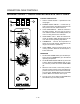
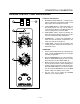
1. The top display reads SEtb. The bottom display
gives the setback mode. To change the setback
press the TOGGLE/CLEAR KEY (11). The botĆ
tom display toggles between YES and no. Press
the SCAN KEY (15).
If no is chosen:
A.) The controller advances to programĆ
ming the temperature mode.
If yes is chosen:
A.) The bottom display gives the current
setback time. Press the TOGGLE/
CLEAR KEY (11). Use the product keys
to the enter the desired setback time.
Press the SCAN KEY (15) to enter the
new setback time.
B.) The bottom display gives the current setĆ
back temperature. Press the TOGGLE/
CLEAR KEY (11). Use the product keys
to the enter a setback temperature from
140_F-300_F. Press the SCAN KEY (15)
to enter the new setback and continue
with programming the temperature
mode.
Programming the temperature mode (_F or _C)
1. The top display reads dEg. The bottom display
gives the units. To change the units press the
TOGGLE/CLEAR KEY (11). The bottom display
toggles between F and C.
2. Press the SCAN KEY (15) to enter the new temĆ
perature units and continue programming the
shelf sensitivity.
Programming the shelf sensitivity
The controller allows the user to program a sensitivity
value (0-9) for each shelf position. The sensitivity
value will shorten or stretch cook time depending
upon shelf position.
NOTE: SEN1 is the top shelf position, SEN5 is the
bottom shelf position.
1. The display reads SEN1.
2. Press the TOGGLE/CLEAR KEY (11) to clear the
current value to the desired value. Use the prodĆ
uct key numbers to input a new sensitivity value.
3. Press the SCAN KEY (15) to advance to the next
shelf position, SEN2.
4. Repeat steps 2-3 for all five shelf positions.
Exiting the programming mode
1. The top display reads SYS. Press the PROG KEY
(10). The control returns to the operating mode.
ERROR CODES AND ALARMS
NOTE: The error codes will appear in the top display.
All error codes are accompanied by an audiĆ
ble alarm.
Hi Oven temperature is more than 40_F
above the highest setpoint.
Prob Probe failure.
HEAT ERR From a cool start (below 140_F), the
oven takes more than 10 minutes to
climb from 150Ć300_F. Press the
TOGGLE/CLEAR KEY (11) to clear the
prompt. This code indicates a problem
with the system. Contact a service
technician.
FAN ERR Indicates a fan failure during a call for
heat. Press the TOGGLE/CLEAR KEY
(11) to clear the alarm. The FAN ERR
display remains active. Press the
TOGGLE/CLEAR KEY (11) again to
clear the message and return the sysĆ
tem to normal operation. If condition
persists turn off the oven and contact
a service technician.
FANC ERR Indicates a contact failure has ocĆ
curred in the fan control circuit. Press
the TOGGLE/CLEAR KEY (11) to clear
the alarm. The FANC ERR display reĆ
mains active. Press the TOGGLE/
CLEAR KEY (11) again to clear the
message and return the system to norĆ
mal operation. If condition persists turn
off the oven and contact a service techĆ
nician.
DOOR OPEN The controller senses the door is open.
Close the door. If the door is closed conĆ
tact a service technician.