
Programming instructions
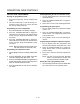
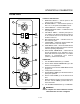
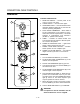
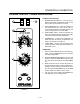
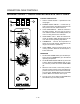
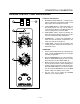

CONVECTION OVEN CONTROLS
1-10
control advances to the next stage programmed
for the pulse fan option.
NOTE: Repeat Steps 4-5 to program cycle times
for all pulse fan stages. When the final
pulse off time has been entered the control
advances to timing mode.
Programming the Timing Mode:
NOTE: It may be necessary to press the ENTER KEY
(14) until the top display reads tC-1.
There are 2 options for timing mode: Straight and
Flex.
1. The top display reads tC-1. The bottom display
gives the current timing mode. Press the
TOGGLE/CLEAR KEY (11) to toggle between St,
and FL.
2. Press the ENTER KEY (14) to save the new timĆ
ing mode for stage 1. The top display reads
tC-2.
NOTE: Repeat Steps 1-2 to program the timing
mode for additional stages.
3. When the timing mode for the final stage has
been entered press the SCAN KEY (15).
Programming Hold Mode:
The hold mode can be toggled on or off for specific
product keys.
1. The top display reads HOLD. The bottom display
reads the current hold mode. Press TOGGLE/
CLEAR KEY (11) to toggle between on and off.
Press the SCAN KEY (15).
2. The bottom display give the current hold time.
Press the TOGGLE/CLEAR KEY (11). Use the
product keys to enter the new hold time. Press
the SCAN KEY (15).
3. The bottom display gives the current hold temĆ
perature. Press the TOGGLE/CLEAR KEY (11).
Use the product keys to enter the new hold temĆ
perature from 140Ć210_F (60Ć99_C). Press the
SCAN KEY (15).
4. The top display reads HFAN (hold fan speed).
The bottom display gives the current hold fan
speed setting. Press the TOGGLE/CLEAR KEY
(11) to toggle between high and low. Press the
SCAN KEY (15) to exit the hold mode programĆ
ming.
Exiting the programming mode:
1. The top display reads Prod. Press the PROG KEY
(10). The control returns to operating mode.
MANAGER LEVEL PROGRAMMING
Entering the programming mode
1. Press the PROG KEY (10). The top display reads
CodE.
2. Use the product keys to enter the programming
access code: 4 5 1 2. Press the ENTER KEY (14).
The top display reads SYS.
Programming hold
Hold allows product to be kept warm in the oven at
a programmed time and temperature by pressing
the HOLD KEY (9).
1. Press the SCAN KEY (15). The top display reads
Hold. Press the TOGGLE/CLEAR KEY (11) to
toggle between YES and no. Press the SCAN
KEY (15).
If no is chosen:
A.) Press the SCAN KEY (15) to advance to
programming the setback mode.
If yes is chosen:
A.) The top display reads HOLD. The botĆ
tom display gives the current hold time.
Press the TOGGLE/CLEAR KEY (11).
Use the product keys to enter a hold
time from 0 to 9 hours. Press the SCAN
KEY (15) to enter the new hold time
(HR:MN)..
B.) The top display reads HOLD. The botĆ
tom display gives the current hold temĆ
perature. Press the TOGGLE/CLEAR
KEY (11). Use the product keys to enter
a hold temperature from 140_F-210_F.
Press the SCAN KEY (15) to enter the
new hold temperature.
C.) The top display reads H FAn. The botĆ
tom display gives the current fan mode.
To change the fan mode press the
TOGGLE/CLEAR KEY (11). The bottom
display toggles between Hi and Lo.
Press the SCAN KEY (15) to enter the
new fan mode and continue with proĆ
gramming the setback mode.