
Programming instructions
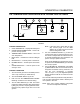
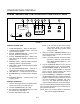
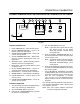
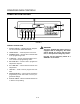
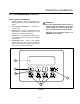

CONVEYOR OVEN CONTROLS
2-10
OPERATION
NOTE: The following example is in _F. The display
will read _C if programmed in celsius.
To turn the oven on:
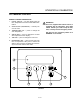
1. Press the OVEN ON/OFF key (2). The control deĆ
faults to the last time and temperature settings
used.
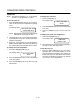
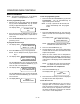
The display reads:
SET TEMP XXXF HEAT
COOK TIME XX:XX
NOTE: HEAT appears in the top line of the display
whenever the control calls for heat.
2. The fans begin to run. The conveyor belt begins
to travel at the set cook time. The heat rises to the
setpoint temperature.
3. When the oven reaches the set temperature,
READY and SET TEMP flash alternately in the top
line of the display and an audible alarm sounds.
To change the cook temperature:
1. Press the TEMPERATURE key (3).
The display reads:
SET POINT TEMP
XXXF
2. Press the ARROW keys (4) to scroll to the desired
cook temperature.
3. Press the ENTER key (6) to set the new cook
temperature.
To change the cook time:
1. Press the TIME key (5).
The display reads:
SET COOK TIME
XX:XX
2. Press the ARROW keys (4) to scroll to the desired
cook time.
3. Press the ENTER key (6) to set the new cook
time.
To display the actual oven temperature:
1. Press both ARROW keys (4) .
The display reads:
TEMP XXXF
DOWN - EXIT
2. Press the down arrow key to return the display to
the setpoint time and temperature.
To turn the oven off:
1. Press the OVEN ON/OFF key (2). The oven is
equipped with a coolĆdown feature for motor
shaft and bearing protection. This enables the
blower motor(s) to run regardless of the controlĆ
ler status. The blower(s) continue to run until the
oven cools to a safe temperature.