
Programming instructions

OPERATION & CALIBRATION
2-9
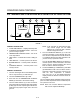
PLC MANUAL CONTROL
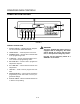
MANUAL CONTROL DESCRIPTION
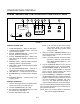
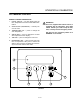
1. DIGITAL DISPLAY - two line display gives the
time, temperature and other control related inforĆ
mation.
2. OVEN ON/OFF (ON/STANDBY) - controls powĆ
er to the oven.
3. TEMPERATURE KEY - press to change the
cook temperature.
4. ARROW KEYS - press to change the set time
and temperature in the display.
5. TIME KEY - press to change the cook time.
6. ENTER/RESET KEY - press to save new cook
time or temperature. Also press to silence the
alarm in case of a fault. The alarm will sound evĆ
ery ten seconds until the fault clears.
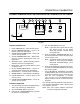
WARNING!!
This oven, supplied with remote control, is
equipped with an emergency shut down
switch. Should you need to stop the belt,
fans, or heat press the emergency switch.
DO NOT use the emergency switch as a
GENERAL on/off switch!
2
1
3 4 5
6
FIGURE 6