
Installation guide





Installing BlipNet
5
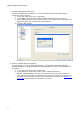
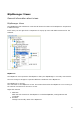
The figure above illustrates the BlipManager main window, which is split in two sub-windows. A
sub-window showing a configuration view which includes a tree of BlipNet components and a
sub-window showing detailed information of the items in the tree.
The Tree is updated automatically. This means that for example when a new terminal is
connected it will be shown in the Configuration View tree automatically and removed
automatically when it is disconnected.
If you want to refresh the tree manually, you can select refresh in the Menu or press the F5
key.