
Installation guide




BlipNet Administrators Guide
66
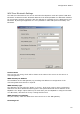
Discoverable and Connectable Modes: If you are using only devices supported by the
Mobility Service, the BlipNodes can be set non-discoverable and non-connectable for added
security. This will ensure that other devices cannot detect and connect to the BlipNodes.
Master/Slave switching: If the BlipNodes are discoverable and connectable, master/slave
switching should be set to Required. Otherwise, an incoming connection could block the
BlipNode for use by other devices.
Standard configurations
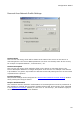
For a pure mobility system, putting the BlipNodes in the “Client Node (No Services)”
configuration is the optimal and most secure solution. BlipNodes in this configuration are not
discoverable or connectable, and the PAN service record is the only active service.
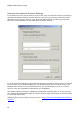
If you want to allow users to make incoming PAN connections or need to connect devices
which only support the older LAN Access Profile, the BlipNodes must be configured with the
LAN Access service record, and the BlipNodes must be both discoverable and connectable. For
this purpose, the “Server Node (All Services)” configuration is a suitable choice.
Note! Users of LAN Access devices need to connect manually to the nearest access point, and
the devices should not be registered as mobility terminals, because the mobility service will fail
to connect to them.