
Installation guide





BlipNet Administrators Guide
60
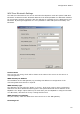
Personal Area Network Protocol Settings
In the PAN profile two types of filtering can be made. They are Network Protocol Type filtering
and Multicast Address filtering. Network Protocol Type filtering is filtering of Ethernet frames
dependent on the Network Protocol Type. Multicast Address filtering is filtering of multicast
Ethernet frames dependent on their destination multicast address.
In the Personal Area Network Protocol Settings window it possible to specify a filter on Network
Protocol Types and on Mutlicast Addresses. The specified filters will be set both locally in the
BlipNode and remotely on connected PAN devices. The specified filters are set on a remote
device as soon as it establishes a PAN session to the BlipNode.
The default PAN filter settings in a BlipNode Configuration including PAN are no filtering at all,
this means that the BlipNode bridges all network protocol types and bridges all multicast traffic
to connected PAN devices.
Network Protocol Type numbers can be found on: http://www.iana.org/assignments/ethernet-
numbers