
Installation guide






BlipNet Administrators Guide
54
BlipNode Services
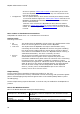
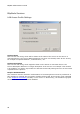
The 3th step in the “Configuration wizard” is the “BlipNode Services” step. This window is used
to configure which services the BlipNode shall advertise towards connecting terminals.
Following services can be activated on a BlipNode:
LAN Access Profile
This service must be activated if the BlipNode shall enable
LAN Access clients, such as PCs, PDAs etc. to access the
LAN behind the BlipNode.
WAP Over Bluetooth
This service must be activated if the BlipNode shall allow
WAP clients, such as phones to connect to a WAP gateway
on the LAN behind the BlipNode.
Object Push Server
This service must be activated if the BlipNode shall allow
devices with object transfer facilities to push objects such
as e.g. business cards to the server.
Obex File Transfer
Server
This service must be activated if the BlipNode shall allow
devices with File Transfer facilities to get and put files to
the server
Personal Area Network
Profile
This service must be activated if the BlipNode shall enable
PAN users (clients) to access the LAN behind the BlipNode.