
Installation guide




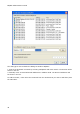

BlipServer Properties
35
3. Never: A Bluetooth connection can never be established
between this terminal and a BlipNode.
Note1: This policy is applied both when the terminal is establishing
the connection and when connection is being established from the
BlipNet API.
Note2: This Policy is independent of the Bluetooth Passkey settings. If
a Pairing is needed and a wrong PIN Code is specified, the transaction
will fail.
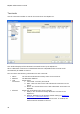
Pin Code
Specifies the Bluetooth Passkey. This can be either "Default" which
refers to the Default Passkey specified in
BlipServer Properties -> Bluetooth Security, or a specific Passkey for
this terminal only.
Mobility
Specifies if this terminal is subscribed to the BlipNet PAN Mobility
Service
Add
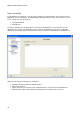
You can add new terminals to BlipNet in two ways:
1. If BlipNet has been open to allow all Bluetooth terminals, you can set-up a Bluetooth
connection from your Bluetooth device towards BlipNet. The terminal will automatically be
added in the list.
2. Pressing the Add Button will bring up a Dialog to add new terminals.