
Installation guide




BlipNet Administrators Guide
32
Security
Use the Security Settings to control the access to the BlipNet System. The Bluetooth passkey
is the PIN code a user will have to use to make a secure relation between the users Bluetooth
device and BlipNet. The creation of this secure relation is called “Pairing” or “Bonding”.
A Bluetooth device shall be either in non-bondable mode or in bondable mode. In bondable
mode the Bluetooth device accepts paring – i.e. creation of bonds – initiated by the remote
device, and in non-bondable mode it does not.
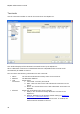
Via the BlipManager it is possible to define a default Bluetooth Passkey and Bluetooth Passkeys
for specific terminals. If a terminal specific Bluetooth Passkey has not been defined, then a
terminal must use the default Bluetooth Passkey when pairing with BlipNet. Otherwise, the
specific terminal Bluetooth Passkey overrules the default Bluetooth Passkey.
When connecting a Bluetooth device to BlipNet it will have to pair in following situations:
Security level is “Link level” and the device is not already paired with BlipNet.
Security level is “Service level”, the user tries to connect to a service with the checkbox
“Require Authentication” checked, e.g. LAN access, and the device is not already paired
with BlipNet.
“Link level” security is not used in any of the standard configurations.
When using the standard configuration "Server Node (All Services)", authentication is required
when accessing the LAN Access, PAN Service or FTP Service, but not the OPP Server Service.
There is no limitation to the number of paired Bluetooth terminals that BlipNet can handle.