
Installation guide





BlipNet Administrators Guide
30
User Accounts
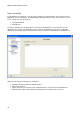
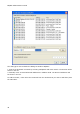
In the BlipServer Properties - User Accounts window everything about user accounts on the
BlipServer can be configured. The BlipManager operates with the term “User account” at two
levels. There is a user account for:
The administrator
Applications
To make it possible for an application to connect to the BlipServer a user account for the
application must exist. An application can connect to the BlipServer using the credentials
defined in this window (login and password). Howto connect an application to the BlipServer.
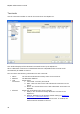
With the User Account settings it is possible to:
Change the password for the Administrator.
Add a new account.
Delete accounts ( this will prevent applications from connecting to the BlipServer).
Edit accounts (this means change the password for a specific user account).