
Installation guide




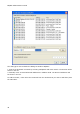

BlipServer Properties
27
Advanced
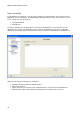
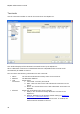
The BlipServer Advanced Settings contains a series of features, which usually not will have to
be edited. The different settings in the BlipServer Advanced window are described below.
Configure BlipServer Logging
The BlipServer has a built in log system. This feature has been made because it can improve
the quality of our support in situations where BlipNet application developers have problems
using the BlipServer API. In this case the system can be used to generate a log file that can be
sent to Ericsson Bluetooth Networks.
Normally there will be no need to make such log files.
Log Level:
Using this list box the log level of the BlipServer can be set. The level can be set to error,
warning, info and trace. Trace is the most detailed level and this level should be used when
sending a trace to Ericsson Bluetooth Networks.
Log to File:
If checked the system will log to a file with the specified file name.
IMPORTANT: There are no built-in restrictions on the size of the file. Switching on logging
during long periods, especially at trace level, might result in a full hard drive, which will
eventually cause the BlipNet to fail.