
Installation guide





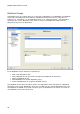

BlipNode Properties
19
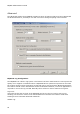
When enabled, trace will be stored in a buffer internally in the BlipNode.
BlipNode Server Configurations
The BlipNode has two servers running internally (FTP Server, Telnet Server). These servers are
accessible via LAN only. A FTP server is used for the software upgrade. Default the FTP server
is disabled and no software upgrade can be made. When the “Auto update of BlipNodes is
enabled” the BlipServer will temporarily overrule this setting. A telnet server can be used for
maintenance.
Obex File Storage Path Configuration
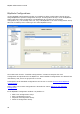
If the checkbox “Store OPP Files in a separate Directory for this BlipNode” is checked, files
received via Object Push Server to this BlipNode, will be stored in the specified folder.
If the checkbox “Store FTP Files in a separate Directory for this BlipNode” is checked, the FTP
Server root folder will the specified folder.
The entered directory/path will be created in the OPP/FTP file storage root path defined in the
BlipServer properties window shown in section BlipServer Properties - Advanced.
OPP Example on Linux:
BlipServer OPP File Storage Root Path: /opt/blipnet/Obex/OPP
BlipNode file storage directory: blipnode1
Received OPP objects on BlipNode1 will then be stored in following path:
/opt/blipnet/Obex/OPP/blipnode1
FTP Example on Windows:
BlipServer FTP File Storage Root Path: C:\Program Files\blipnet\Obex\FTP
BlipNode file storage directory: blipnode1
New FTP root Folder on BlipNode1 will then be the following path: C:\Program
Files\blipnet\Obex\FTP\blipnode1
BlipNode not on same subnet as BlipServer
If enabled and a BlipServer IP address is specified in the BlipServer advanced Property sheet,
the BlipNode will try to connect to the BlipServer IP address before sending out broadcast
during the startup process. See also the BlipServer Properties - Advanced for more information
on this topic.