
Installation guide






BlipNet Administrators Guide
18
Advanced
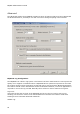
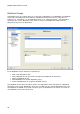
The Advanced window for a BlipNode contains a series of features that have been categorized
as advanced features; normally a user will not need to change anything in this window.
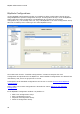
BlipNode Log Configuration
The BlipNode has a built in log system. This feature has been made because it can improve the
quality of our support in situations where a BlipNode fails to operate as expected. In this case
the system can be used to generate a log file that can be sent to Ericsson Bluetooth Networks.
The feature should not be used without contact to Bluetooth Network, since a PC application is
required to receive the log via LAN. Normally there will be no need to make such log files.
Log Level:
Using this list box the log level of the BlipNode can be set. The level can be set to error,
warning, info and trace. Trace is the most detailed level and this level shall be used when
sending a trace to Ericsson Bluetooth Networks .
Hidden Log: