
Installation guide



BlipNet Administrators Guide
14
Allowed Terminals
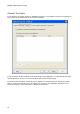
In the Allowed Terminals window in BlipNode Properties it is possible to make a list containing
terminals that are disallowed on the specific BlipNode.
If the checkbox “Enable local terminal blacklisting on this BlipNode” is unchecked all terminals
will be allowed to connect. This is the default and recommended setting.
By checking this checkbox, terminals can be added to a disallowed list by clicking the “Add”
button. These terminals will never be allowed to connect to this BlipNode regardless of the
terminals setting in Terminals Panel in BlipServer Properties.