
Installation guide



BlipNet Administrators Guide
10
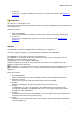
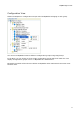
BlipNode View
Shows the BlipNode structure. This is especially useful if you have wireless BlipNodes as the
Tree will illustrate the Wireless Topology.
All BlipNodes shown as direct children to the BlipServer are BlipNodes connected to the Server
through Ethernet.
A BlipNode show as a child to another BlipNode is a wireless BlipNode meaning that the
wireless BlipNode is connected to the BlipServer with a Bluetooth PAN connection through the
parent BlipNode(s).
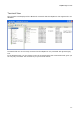
You can use Drag and Drop to specify the Topology of the Wireless BlipNodes.
1. Dropping a BlipNode on the BlipServer Icon makes the BlipNode an Ethernet BlipNode.
2. Dropping a BlipNode on another BlipNode makes the "dropped" BlipNode a Wireless
BlipNode. The BlipNode will use a Bluetooth connection to the parent BlipNode in order
to communicate with the BlipServer.
For more information about Wireless BlipNodes please read the chapter About Wireless
BlipNnodes