
Installation guide





6
BlipManager Views
General information about views
BlipManager Views
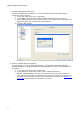
The BlipManager has 3 different views that all shows the status of the BlipServer components
in different ways.
In all views you can right click a component for a pop-up menu with different actions for the
selected.
BlipServer
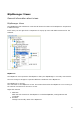
The BlipServer Icon represents the BlipServer that your BlipManager is currently connected to.
The Icon change to images to represent different conditions of the BlipServer:
The BlipServer is running
The connection to the BlipServer is lost. This means that either the BlipServer is not running or
the network connection to the server is lost.
Right Click Actions
1. Add New
Add new sub elements to the BlipServer. Includes BlipNodes, Configurations and
Terminals.
2. Rename
Change the Friendly name of the BlipServer