
Operating instructions


14
OPERATION
Connecting headphones
A pair of stereo headphones is supp-
lied with the unit.
➮ Connect the headphones by care-
fully inserting the headphone plug
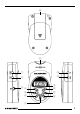
into the headphone jack 3 until it
reaches its end position.
Switching on/off
➮ To switch the unit on, press button
1.
The unit switches on. Playback begins
with the first track on the MMC.
➮ To switch the unit off, press button
1 for longer than two seconds.
The unit switches off.
Securing the unit (HOLD)
You can prevent the unit’s controls from
accidentally being operated, e.g. by
other objects in your pocket.
To activate the HOLD function,
➮ press the HOLD button 2 for lon-
ger than two seconds.
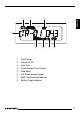
„HOLD“ appears in the display. If you
now press a button, „HOLD“ will appear
in the display. If you want to operate the
unit again, you must first deactivate the
HOLD function.
To deactivate the HOLD function,
➮ press the HOLD button 2 for lon-
ger than two seconds.
„HOLD“ disappears from the display.
Adjusting the volume
You can adjust the volume from 0 to 30.
To increase the volume,
➮ press the UP button =.
To decrease the volume,
➮ press the DOWN button >.
Inserting/removing an MMC
To avoid damaging the MMC, you
should only change the MMC whilst the
unit is switched off.
To insert an MMC,
➮ hold the MMC with its printed side
uppermost and gently slide it
(whilst keeping it straight) into the
MMC slot 8 until it reaches its end
position.
To remove an MMC,
➮ hold the MMC by your fingertips
and pull it straight out of the MMC
slot 8.
Selecting tracks
➮ Press the << button 5 to select
the previous track.
If you press the << button 5 once, the
current track will be played again from
the beginning.
➮ Press the >> button ; to select
the next track.