
Operating instructions

12
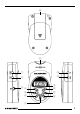
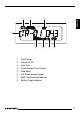
1 POWER button, for switching
the unit on/off.
2 HOLD button, to secure the unit
and therefore prevent its con-
trols from accidentally being
operated.
3 Headphones jack, 3.5 mm ste-
reo jack.
4 A–B button, to define an excerpt
in a piece of music that you want
played repeatedly.
5 Backwards track selection,
fast-reverse search.
6 INT button, to play all the tracks
on an MMC for 10 seconds.
7 PAUSE/ PLAY button, to pause
playback.
8 MMC slot into which MMCs can
be inserted.
9 Display.
: SEL button, to adjust the treble
and bass.
; Forwards track selection,
fast-forward search.
< RPT button, to switch the repeat
function on/off.
= UP button, to adjust the volume,
treble and bass.
> DOWN button, to adjust the vo-
lume, treble and bass.
? Battery compartment cover.
CONTROLS
Inserting batteries .................. 13
Connecting headphones ........ 14
Switching on/off .................... 14
Securing the unit (HOLD) ...... 14
Adjusting the volume ............. 14
Inserting/removing an MMC .. 14
Selecting tracks ..................... 14
Fast Search (Audible) ............ 15
Repeating tracks (REPEAT) ... 15
Repeating an excerpt from
a piece of music (A – B) ........ 15
Cancelling A – B ........................... 15
Briefly playing all tracks
(INTRO) .................................. 15
INTRO function, continuing
listening to a track ......................... 16
Pausing playback (PAUSE) .... 16
Resuming playback ....................... 16
Adjusting the audio settings .. 16
Adjusting the treble ....................... 16
Adjusting the bass ......................... 16
Specifications ........................ 17
CONTENTS