MP3 GTP 01-MP3 Operating instructions
Bitte aufklappen Open here Ouvrir s.v.p. Aprite la pagina Hier openslaan a.u.b.
= 2 > 34 9 : 5 ; 6 < ESPAÑOL 1 PORTUGUÊS SVENSKA 8 NEDERLANDS ITALIANO FRANÇAIS ENGLISH DEUTSCH ? 7 3
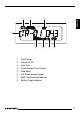
DEUTSCH 3 2 FRANÇAIS ENGLISH 1 7 8 ESPAÑOL SVENSKA Play/Pause Repeat On/All Intro Scan Track Number/Time Counter Hold Mode A-B Select excerpt repeat MMC Card Insertion Indicator Battery Carge Indicator PORTUGUÊS 1 2 3 4 5 6 7 8 6 NEDERLANDS 5 ITALIANO 4 11
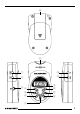
CONTROLS 1 2 3 4 5 6 7 8 9 : ; < = > ? 12 POWER button, for switching the unit on/off. HOLD button, to secure the unit and therefore prevent its controls from accidentally being operated. Headphones jack, 3.5 mm stereo jack. A–B button, to define an excerpt in a piece of music that you want played repeatedly. Backwards track selection, fast-reverse search. INT button, to play all the tracks on an MMC for 10 seconds. PAUSE/ PLAY button, to pause playback. MMC slot into which MMCs can be inserted.
➮ insert two AAA-size 1.5 V batteries as indicated by the symbols in the battery compartment. ➮ slide the battery compartment cover from the top of the unit into the guide until it clicks into place. Note: To avoid damaging the GTP 01-MP3, please observe the following: ● Always replace both batteries at the same time. ● Remove the batteries if you are not using the GTP 01-MP3 for a longer period of time. ● Remove the batteries as soon as they are drained.
OPERATION Connecting headphones Adjusting the volume A pair of stereo headphones is supplied with the unit. You can adjust the volume from 0 to 30. To increase the volume, ➮ Connect the headphones by carefully inserting the headphone plug into the headphone jack 3 until it reaches its end position. ➮ press the UP button =. To decrease the volume, ➮ press the DOWN button >.
beginning of the required excerpt. „A –“ appears in the display. Repeating a track ➮ At the end of the required excerpt, If you want to repeat a track, „RPT“ appears in the display. The track is repeated until you cancel the repeat function. press the A – B button 4 again. „A – B“ appears in the display. The excerpt that you selected between the two button presses will be repeated until you cancel the function.
OPERATION INTRO function, continuing listening to a track If you want to continue listening to a track on the MMC that is currently being intro-scanned, ➮ press the SEL : button if you want to adjust the bass. The settings are saved. Adjusting the bass ➮ press the INT button 6. To optimise the sound, you can set the bass to a value between –9 and +9. „INT“ disappears from the display. ➮ Press the SEL button : three Pausing playback (PAUSE) times.
Treble control: 10 kHz (+/- 10 dB) Frequency response: 20 - 20,000 Hz Dimensions (LxBxH): 91 x 53 x 22 mm ENGLISH 100 Hz (+/- 10 dB) FRANÇAIS Bass control: DEUTSCH SPECIFICATIONS Headphones connection Operation with two AAA batteries (Micro batteries, not included) ITALIANO Operation with MMC cards (8/16/32/64 MB, not included) NEDERLANDS Includes: GTP 01-MP3, headphones, carrying strap, operating instructions.
Service-Nummern / Service numbers / Numéros du service d’assistance téléphonique / Numeri del servizio di assistenza / Servicenummers / Telefonnummer för service / Números de servicio / Números de serviço / Servicenumre Country: Phone: Fax: WWW: http://www.blaupunkt.