
Operating instructions





25
DEUTSCH
ENGLISCH
FRANÇAIS
ITALIANO
ESPAÑOL
PORTUGUÊS
NEDERLANDS
SVENSKA
NORGE
SUOMI
TÜRKÇE
BASIC FUNCTIONS
Removing a DVD
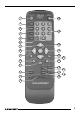
➮ Press the OPEN/CLOSE button
J.
The DVD drawer opens.
➮ Remove the DVD from the drawer.
To close the drawer again:
➮ Press the OPEN/CLOSE button J
again.
Playing a DVD
Once you insert the DVD in the unit, ei-
ther the DVD’s menu will appear or play-
back will begin. This depends on the
DVD that is inserted. After you have
selected (if need be) the playback lan-
guage, follow the menu instructions
(“Start Film”).
➮ Press the PLAY button ?.
Playback begins.
On-screen display
At any time you can view the various
settings provided by the DVD and the
current device mode in an on-screen
display.
The information shown in the display
depends on the DVD that is inserted.
Some standard types of information are:
● T 1/3: The first of three titles on the
DVD is currently being played.
● C 7/23: The seventh of 23 chapters
on the DVD is currently being
played.
● T 01:07:12: One hour, seven min-
utes and twelve seconds of the
current title’s playing time have
elapsed.
The right edge of the on-screen display
contains symbols to display:
● Whether you made a selection
from the DVD menu.
● What mode the device is currently
in, e.g. playback, still image or slow
motion mode.
● Whether you tried to access a cer-
tain function that is not available for
the current device mode or the cur-
rent DVD.
If the on-screen display is switched off,
these symbols will be displayed briefly
when you operate a corresponding func-
tion.
Switching on the on-screen display
➮ Press the DISPLAY button 2.
The on-screen display will appear at the
top edge of the screen.
Note:
Certain DVDs provide more settings
than can be displayed in one go in the
on-screen display. You can browse
through all of the available settings by
repeatedly pressing the DISPLAY but-
ton 2.
If you access certain functions, the on-
screen display will appear automatically.
You can switch off the display again
manually.
Switching off the on-screen display
➮ Keep pressing the DISPLAY button
2 until the on-screen display dis-
appears.