
Operating instructions





24
INTRODUCTION
DVD - video technology of
the future
DVD is not only a forward-pointing tech-
nology in the video area. After all, DVD
does stand for Digital “Versatile” Disc.
The DVD has the same format as a CD
or CD-ROM but can store up to 17
gigabytes of data. In comparison, a CD-
ROM can only store 650 megabytes.
This kind of storage capacity is large
enough for high-quality audio and video
recordings - and for a few extras.
A DVD video does not just contain the
film itself, it also includes extras like the
trailer or the “making of”. The film can
also be watched in various languages
and with various subtitles. You can con-
veniently access all of these functions
using the menu provided by the DVD.
Basic functions
You can also use the DVP 01 to play
standard audio CDs. However, these
operating instructions will only deal with
playing DVDs. The button functions for
playing audio CDs are the same as
those for DVDs.
The DVP 01 is equipped to play DVDs
with the country code 2. If the unit is
intended for use with other country
codes, you will be informed of this by a
sticker on the back of these operating
instructions and on the unit.
Switching on/off
To switch the unit on/off:
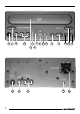
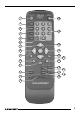
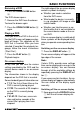
➮ Press the POWER button 1.
If the unit already contains a DVD when
you switch it on, the DVD’s menu will
appear automatically or playback will
begin. This depends on the DVD that is
inserted.
Inserting a DVD
➮ To insert a DVD, press the OPEN/
CLOSE button J.
The DVD drawer opens.
➮ Place the DVD with the printed
side uppermost in the drawer’s re-
cess.
➮ Press the OPEN/CLOSE button J
again.
The DVD drawer is retracted. Either the
DVD’s menu will now appear on-screen
or playback will begin. This depends on
the DVD that is inserted.
BASIC FUNCTIONS