
Operating instructions





20
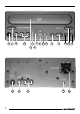
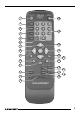
CONTROLS
1 POWER button - to switch the
unit on/off
2 DISPLAY button - to show/hide
the status bar on the monitor
3 ANGLE button - to select a cam-
era angle
4 SUBTITLE button - to select film
subtitles
5 AUDIO button - to select the film
language
6 ZOOM button - to enlarge a
screen section during playback
7
button - to move the selection
pointer in menus
8 button - to move the selection
pointer in menus
9 MENU button - to open a DVD’s
main menu
: RETURN button - to exit a menu
item in a menu
; A-B button - to mark a custom
sequence on a DVD
< SLOW button - to start/stop slow
motion
= PAUSE button - to pause play-
back
> STOP button - to stop playback
? PLAY button - to start playback
@
button - to fast rewind
A button - to fast forward
B button - to skip to the start of
the chapter
C
button - to skip to the start of
the next chapter
D REPEAT button - to repeat a
chapter or title of a film
E
button - to move the selection
pointer in menus
F SETUP button - to open the
setup menu of the DVP 01
G
button - to move the selection
pointer in menus
H ENTER button - to select menu
items
I 0-9 buttons - to enter numbers
J OPEN/CLOSE button - to open
and close the drive drawer
K Drive drawer
L AUDIO inputs - to connect an
external audio source
M VIDEO input - to connect an
external video source
N SENSOR - IR remote control
sensor
O S-VIDEO OUTPUT - S-VHS
output
P VIDEO output - to connect a
monitor
Q AUDIO outputs - to connect a
Blaupunkt audio system
R WIRE REMOTE - to connect a
cable remote control (option)
S DC 12V/24V input - to connect
the DVP 01 to a 12 V / 24 V volt-
age source