
Operating instructions





26
BASIC FUNCTIONS
Fast forwarding and rewinding
Fast forwarding
To fast forward or super-fast forward the
DVD:
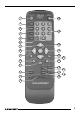
➮ Press the button A once or
twice respectively.
Fast rewinding
To fast rewind or super-fast rewind the
DVD:
➮ Press the button @ once or
twice respectively.
Stopping fast forwarding /
rewinding
To stop fast forwarding / rewinding:
➮ Press the PLAY button ?.
The DVD will then be played at normal
speed.
Slow motion
You can slow down DVD playback.
➮ To reduce the playback speed,
press the SLOW button < once or
several times.
Every press of the button causes the
speed to be slowed down by half.
➮ If you press the SLOW button <
four times, you can slow down the
playback speed to a maximum of
one sixteenth of the normal play-
back speed.
To play a DVD at normal speed again:
➮ Press the PLAY button ?.
Stopping and resuming
playback
Stopping playback
➮ Press the STOP button >.
Playback is interrupted.
Resuming playback
➮ Press the PLAY button ?.
Playback is resumed.
Still image
➮ Press the PAUSE button =.
Playback is interrupted and is frozen as
a still image.
Note:
You can move forwards frame-by-frame
by repeatedly pressing the PAUSE but-
ton =.
To continue playback, press the PLAY
button ?.
Skipping chapters
DVD titles may be divided into several
smaller chapters. To skip to the next or
any other subsequent chapter:
➮ Press the button C once or
several times.
Playback will skip to the start of the next
or another subsequent chapter accord-
ingly.
To skip to the start of the current or a
previous chapter:
➮ Press the button B once or
several times.