
Specifications




724-746-5500 | blackbox.com
Page 12
Chapter 6: Attaching External Antennas
6. Attaching External Antennas
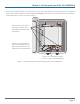
The dual-band omnidirectional antennas are available from Black Box in a set of four to fit the four N-type antenna connectors on
the top of the enclosure. The two connectors near the rear are for the 2.4-GHz radio, and the two near the front are for the
5-GHz radio. You can attach any of the antennas in the set to any of the N connectors on the enclosure; they are all interchange-
able.
1. Remove the plastic caps from the antenna connectors on the enclosure.
NOTE: If you do not use all four antennas, cover the unused connectors with weatherproof N-Type caps (included) to keep them
protected.
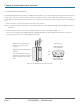
2. Screw the antennas onto the connectors by hand, turning them clockwise until tight (see Figure 12).
You do not need to apply self-amalgamating PTFE (polytetrafluoroethylene) tape around the threads of the connectors to
create a waterproof seal or use a tool to tighten the antennas.
Antenna connectors
for the 5 GHz radio
Antenna connectors
for the 2.4 GHz radio
(bird’s eye view)
Front
Rear
Attach the four antennas to the
connectors on the top of the
enclosure.
Tighten by hand by turning them
clockwise.
You can attach any of the four
antennas to any of the connectors,
and you can attach them in any
order.
Figure 12. Attaching antennas to the enclosure.