
Specifications




724-746-5500 | blackbox.com
Page 11
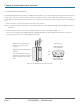
Chapter 5: Enclosing the SmartPath AP (LWN602HA)
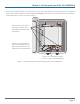
2. Connect the RP SMA coaxial cables to the antenna connectors, run the short Ethernet cable from the right port in the Ethernet
protection device to the ETH0 port on the SmartPath AP (LWN602HA), and connect the second power line to the SmartPath
AP 48-volt DC power connector, as shown in Figure 11.
Link the antenna connectors on
the enclosure to those on the
SmartPath AP with four RP SMA
coaxial cables.
Run the 12" (30.5 cm) Ethernet
cable from the right port on the
Ethernet protection device to the
ETH0 power on the SmartPath AP.
Connect the second power line to the
power connector on the SmartPath AP.
Figure 11. Connecting the Ethernet cable and antenna wires to the SmartPath AP.