
User manual





8
Biomark Tag Manager™ User Manual
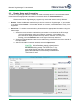
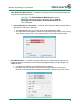
Filter Duplicates While Scan In - If checked, the program will not record duplicate data that
might be scanned during a session.
Cool Tip: The Filter Duplicates While Scan In function
cannot be unchecked unless both other options, Pop Up
Messages On Look-up IDs & Enter Measurements, are
also unchecked.
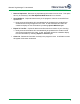
Pop Up Message On Look-up IDs - If checked, the program will display a popup when a
tag from the Look-up list is detected.
Any tag detected that is on the Look-up list will be highlighted in RED.
Once the alert window appears, the user has the option to keep the tag in the Look-up
list or remove it from the list. One of these options must be selected to proceed.
Enter Measurement - If checked, the program will bring up a window allowing the input of
additional data that corresponds to the animal being tagged including: Length, Weight, and
additional notes.
The Site ID and Species can be adjusted from this window.
Information can only be input into the length and weight fields as numbers and
decimals. A warning window will display if information is entered in any other format.