
User manual




12
Biomark Tag Manager™ User Manual
5. Tag Memory Manager
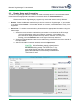
The Tag Memory Manager tab is where a readers memory can be downloaded or cleared. With
the click of a button your reader’s tag memory can be downloaded, along with the date and time,
download time, duplicate information and, if available the latitude and longitude of where the tag
was detected. Data can then be sent to MS Excel or text file.
5.1 Downloading Data
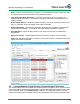
Download Tags - Tag Manager will download the attached reader’s memory into the chart
on the screen. Please note that this can take several minutes, especially if large quantities of
tag information is being downloaded.
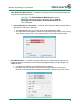
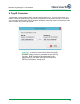
A notification window will appear once the download is complete. It will display the
total number of tag ID’s downloaded as and how many of those ID’s were duplicates.
Any tags that are also listed in the Look-up List will appear with RED highlighting.
Double clicking any of the highlighted tag ID’s will take you to the tag in the Look-up
List.