
User guide



37
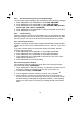
4. Press <MENU/OK> and <UP/DOWN> to select ON or OFF to turn the remote
5. Press <MENU/OK> to confirm.
1. Press <MENU/OK> and <UP/DOWN> to select ANS. MACHINE.
2. Press <MENU/OK> and <UP/DOWN> to select
TAM SETTINGS.
3. Press <MENU/OK> and <UP/DOWN> to select REMOTE ACC.
8.5.8.2 Activate or Deactivate the Remote Access
access on or off respectively.
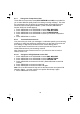
You can ring your phone from another tone-dialling phone to switch the
answering machine on or off, and/or listen to your messages remotely.
1. Place a call from a tone-dialling phone to your phone.
2. When the answering machine answers the call and starts playing the OGM,
Note: The * must be entered while the OGM is still playing, and the 4-digit PIN
3. Enter the 4-digit Remote Access PIN (default PIN is 0000). You will not hear
Note: If the 4-digit Remote Access PIN is entered incorrectly three times
consecutively, the line will be released automatically.
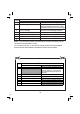
4. Press the following keys to carry out your desired function.
should be follow without any delays.
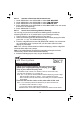
8.5.8.3 Access Your Answering Machine Remotely
any confirmation tones or prompts, but you will need to press 5 to start
playing any messages.
press the <*> key. The OGM will stop playing
Remote operation
Using a tone-dialling phone, dial your home number
You can also use the codes on the other side of this card
While your outgoing message is playing, press
Key in your remote security code
The default code is 0000. For details of how to set a new code,
see the User Guide
8.5.9.1 on page 36.
1
2
3
4
Note: <*> key must be entered while the OGM is still playing, and the 4-digit
consecutively, the line will be release
d
Note: If your answering machine is switched off, the phone will enter into
the remote access mode after 14 rings.
You can then enter the 4-digit remote access PIN
(Default Remote Access PIN is 0000) to activate the remote access feature.
The
PIN should follow without any delays.. If the 4-digit Remote Access
PIN is entered incorrectly three times
automatically.
Link Plus system