
User guide


15
Note: When pairing a new mobile, the connected mobile has to be disabled
temporarily.
4.2.3 Paired Devices
The mobile(s) paired up will be displayed in the paired devices list, no matter it
(they) is (are) connected or not. You can choose to connect, or remove the
mobile from this menu.
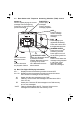
1. Press <MENU> and then <UP/DOWN> to select PAIRED UNITS.
2. Display will show the mobile name of paired device(s).
Note: Display will show “EMPTY” if there is no device paired.
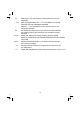
3. Press <MENU> and then <UP/DOWN> to select the desired mobile device.
For the connected mobile device:
4. Press <MENU> to remove the mobile device.
5. Press <MENU> to confirm.
For the mobile phone that is not connected:
5. Press <MENU> and then <UP/DOWN> to select CONNECT or REMOVE.
6. Press <MENU> to confirm. If you select REMOVE, press <MENU> again to
confirm.
Notes: When the connected mobile is removed, corresponding Bluetooth
device icon and LED on base will be off.
. When the disconnected mobile is connected, corresponding device or will be
on.
. When the mobile is removed, the device name will be removed and EMPTY
will be displayed instead in the paired device list.
4.3 Make a Call
4.3.1 Preparatory dialing
Using the home line
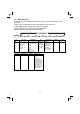
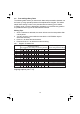
Enter the phone number and press <TALK ON> or <SPEAKERPHONE> to dial
the number with home line.
Using the mobile line
Enter the phone number and press <MOBILE> to dial the number with mobile
line. If there are two mobile devices connected, you have to select one device
from the list.
Note: If no mobile device connected, display will show “NO MOBILE” and then
back to idle.