
User guide


9
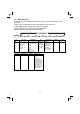
0F-> --
0n-> XX
00 Steady ON: No voice messages in the TAM.
XX Flashing: There are XX new messages recorded where XX is
ZZ Steady ON: There are ZZ old messages in the TAM memory
no new messages.
XX/FF Flashing XX alternately with FF: There are XX new voice
and
Displayed when the answering machine is turned ON where
Displayed when the answering machine is turned OFF
3.4 Base Two Digit-LED Display Information
from 01 to 59.
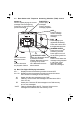
3.3 Base Station with Telephone Answering Machine (TAM) Control
Press to turn on the
Press again to turn off
PLAY/STOP
Press to play
Press to stop the
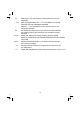
message playback
DELETE
Press once to
machine.
Press to increase
answering machine.
the answering
Press to repeat playing the current
message from the beginning.
Press twice to skip back to the
delete the
message
during playback
all the old messages
SKIP
Press to skip the
current message
and play the next
message
messages
playback Volume.
Press to decrease
Volume.
the playback
In idle mode, press
and hold to delete
previous message.
Press to page your
registered handset(s).
Press and hold to start
the registration process.
XX is number of messages in TAM memory.
messages recorded and the TAM memory is full.
FIND
REPEAT
ANSWER ON/OFF
1 2
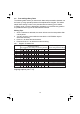
BLUETOOTH LEDs
Steady ON: Bluetooth device
Flashes: Bluetooth device is
in pairing set-up mode.
is paired to the base.
Off: If Bluetooth device is
disconnected.