
Owner's Manual


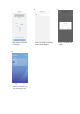


2. Input your registered email address and select “Reset Password”
3. You will receive a message, and need to click “OK”
4. Open your email, where you will find an email from Bestway
5. Open the email and click the link
6. Input your registered email address and your new password, and click “Reset”
7. Log in with your new password.
Disconnect
Press the button for 5 seconds until the indicator is flashing.
PUMP MAINTENANCE
CAUTION:
YOU MUST ENSURE THE FILTER PUMP IS UNPLUGGED BEFORE
ANY MAINTENANCE BEGINS OR FACE SEVERE RISK OF INJURY OR DEATH.
1) Unplug the Filter Pump.
2) Stop water flowing to the Filter Pump. (Refer to pool’s manual.)
3) Unscrew the Filter Cap Retainer and remove the Filter Cap.
4) Clean the Filter Cartridge with a garden hose.If filter
cartridge remains soiled
or
discolored, it is necessary to replace it with a new o
ne.
5) Insert the cleaned (or new) Filter Cartridge; ensure it
is centered in the Filter Pump.
6) Check that the Filter Cap Seal is in place.
7) Replace the Filter Cap and screw the
Filter Cap Retainer into p
osition.
8) Open the Valve A and B.
9) Follow the PUMP INSTALLATION DIRECTIONS section to prepare the system for
use.
IMPORTANT: To ensure pool water stays clean, please clean the filter cartridge
every day. For sanitary reasons, wesuggest replacing the Filter Cartridge with a new one
every two weeks.
PUMP STORAGE
1) Unplug the Filter Pump.
2) Stop water flowing into the Filter Pump and to remove the Filter Cartridge.
3)
Discard the Filter Cartridge.
4) Detach all Hoses.
5) Dry all components thoroughly.
6)
Store the filter pump in a dry location out of the reach of children.Storage temperature:
4-40°C(39.2-104°F)
7)
Drain the pool according to the Pool Owner’s Manual.
PUMP WARRANTY
For information concerning pump warranty please visit our website at:
www.bestwaycorp.com