
Installation instructions



15
23. OPERATION (CONT'D)
Grease filter maintenance indicator
• After 30 hours of operation, the grease filter maintenance icon (item 5 on control illustration) appears. This means filters need to be
cleaned.
• Once the grease filter cleaning is done, press on grease filter reset push-button to reset the filter maintenance timer.
Interface backlighting
• Off mode (Blower off, Particulates sensor and Air refresh modes disabled): Backlighting is off.
• Halogen lighting activated: does not affect backlighting.
• Blower turns on: Backlighting at maximum intensity.
• Particulates sensor and Air refresh mode activated: Backlighting at maximum intensity.
• Particulates sensor at sensitivity settings and Air refresh in activated mode: Backlighting at minimum intensity.
HEAT SENTRY™
This hood is equipped with a HEAT SENTRY™ thermostat. This thermostat is a device that will start or speed up the blower if it senses
excessive heat above the cooking surface.
• If blower is OFF—it turns the blower to speed 3 (blower speed icon shows H).
• If blower is ON—it turns the blower up to speed 3 (blower speed icon shows H).
NOTE: When Heat Sentry™ is activated, Air refresh mode and Particulate sensor are inactivated. Also, communication coming from
the LinkLogic® Module is disabled.
• When the temperature level drops to normal, the blower will return to its original setting (blower speed icon will show the original
blower speed).
• To turn off the blower when Heat Sentry™ is activated, press and hold the blower push-button (item 2 on illustration) for more than
1 second.
LinkLogic® Network compatibility
Your IP29M Series range hood can be linked to LinkLogic network, if installed in your house.
LINKLOGIC LINKING INSTRUCTIONS
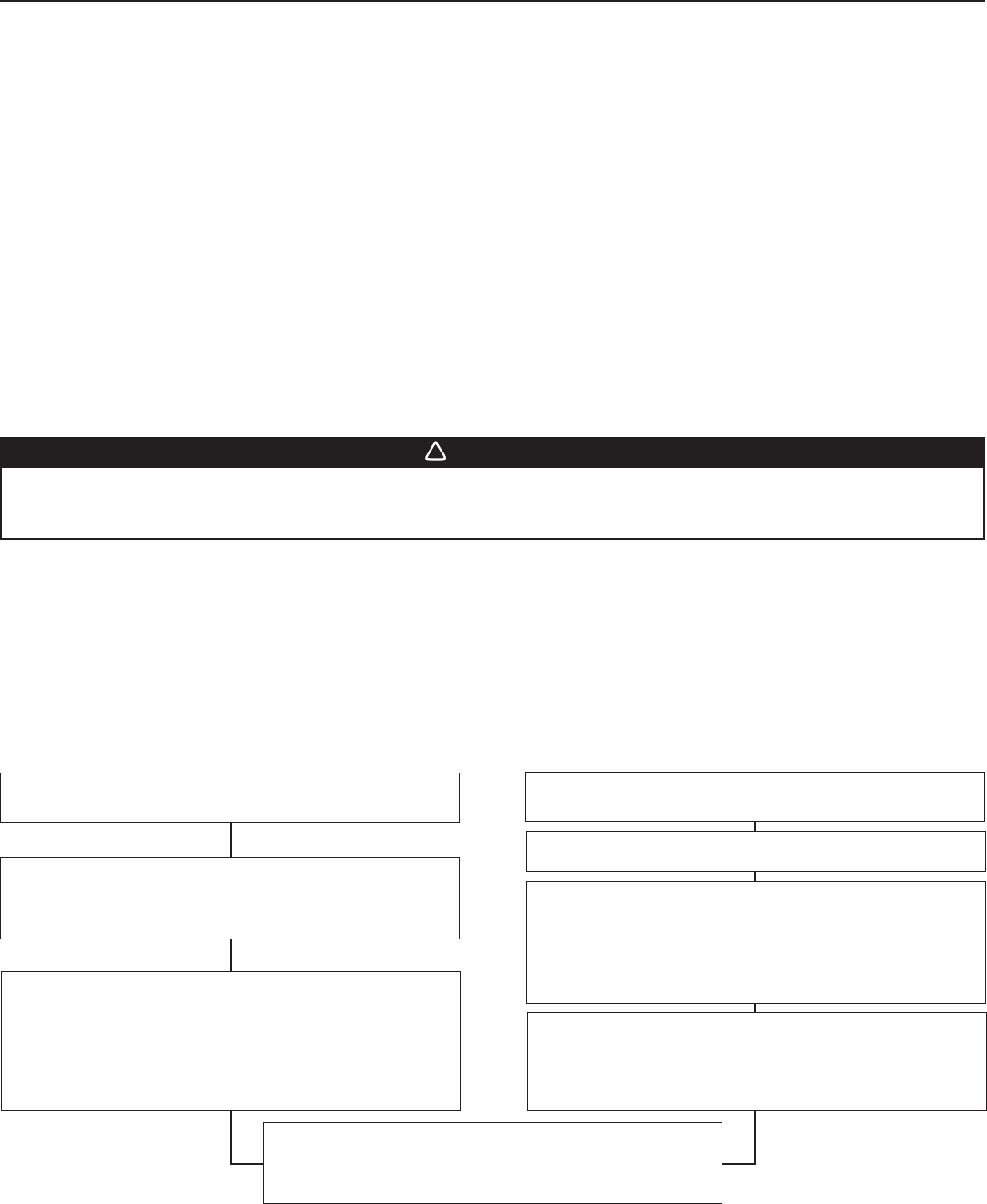
A. ACTIVATE THE “LINK” MODE OF THE HOOD
Push the LinkLogic link mode push-button (item 4 on control illustration) for 2 seconds; the LinkLogic icon of the interface (item 11 on
control illustration) should be visible and backlighting is full intensity at that point.
WARNING
!
The HEAT SENTRY can start the blower during a range top re or other excessive heat situations even if the hood is turned off. In this
case, it is impossible to turn the blower OFF using control panel buttons. If you must stop the blower, unplug the blower power cord
(located behind the lters) from the hood by pulling on its 2-prong connector; do not pull on the wire.
LINK FOR WALL REMOTE CONTROL, REMOTE CONTROL
OR
REMOTE BLOWER MODULES
LINK FOR SMARTSENSE™ OR MAKE-UP AIR MODULES
ACTIVATE THE “LINK” MODE OF THE LINKLOGIC DEVICE
Push the “link” button of the LinkLogic device for
a specific duration to activate its link mode
(see instructions of LinkLogic device).
STA RT THE “A UTO-LINK” PROCESS OF THE HOOD
Push the LinkLogic link mode push-button
(item 4 on illustration) to start the “Auto-Link” process,
flashing “A” should be visible (item 8 on control illustration)
on the interface until link is done.
NOTE: For some LinkLogic devices, no “A” will be flashing
because the linking duration is too short.
GO TO STEP 22 (ON NEXT PAG E) TO CONFIGURE LINKLOGIC BOARD
JUMPERS BASED ON BLOWER PERFORMANCE.
STA RT THE “MASTER LINK” PROCESS OF THE HOOD
Push the LinkLogic master link mode push-button
(item 1 on illustration) to start the “Master Link” process,
flashing “L” should be visible (item 8 on control illustration)on
the hood interface, meaning that the hood is waiting for a
SmartSense™ or Make-Up Air module to link.
ACTIVATE THE “LINK” MODE OF THE LINKLOGIC DEVICE
Push the “link” button of the LinkLogic device
(see instructions of device for location) for a specific duration to
activate its Link mode. Wait for the “L” to disappear from the
hood interface to do next step.
LINK OF ANOTHER LINKLOGIC DEVICE
Go back to the appropriate first step if another LinkLogic device
needs to be linked. Otherwise, to exit “link” mode, go to
E
XIT LINK MODE OF THE HOOD.
B. EXIT LINK MODE OF THE HOOD
Press and hold LinkLogic link mode push-button (item 4 on control illustration) for 2 seconds to exit “link” mode. Link mode remains
activated for 4 minutes if no other operation is done.