
Operation Manual






Capture mode 13
English
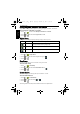
ISO
ISO configures the camera’s sensitivity to light. The higher the ISO value, the brighter
picture you can take in a low-light environment. Yet, you may see more noise in the picture
as you increase the ISO value.
To select an ISO value:
1. Press > ISO.
2. Press or to select an ISO Value.
3. Press to confirm setting.
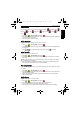
AE metering
To select an AE metering option:
1. Press > Metering.
2. Press or to select an AE metering option.
3. Press to confirm setting.
Effect
Adds color filter effects to the image or video you want to capture.
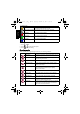
Icon Description
Automatically sets the ISO value.
Equivalent to color ISO 50/100/200 film. Used for outdoor
photography in bright sunlight.
Equivalent to color ISO 400/800/1600/3200/6400 film. Used it in
a low-light environment or where the flash light is not allowed.
• ISO 3200 for resolution of 3M or under only
• ISO 6400 for resolution of 1M (1280 x 960) only
Icon Mode Description
Matrix Detects the exposure based on multiple points in
the subject area.
Cent. Weight (Center Weight) Detects the exposure of the entire shooting
screen, but gives more importance to the values
near center.
Spot Detects the exposure based on the center spot in
the subject area.
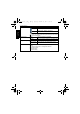
Icon Mode Description
Normal No effects are added.
Vivid Adds an effect with very clear and bright color tones.
W1220_UM - EN.book Page 13 Thursday, December 10, 2009 11:43 AM