
Operation Manual







Capture mode 11
English
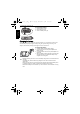
Image size
To select an image size:
1. Press > Resolution.
2. Press or to select a setting.
3. Press to confirm setting.
Image quality
To select an image quality level:
1. Press > Image Quality.
2. Press or to select a setting.
3. Press to confirm setting.
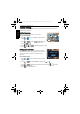
Setting EV
EV (Exposure Value) lightens or darkens the entire
image. Adjust EV when the brightness between the
subject and the background is not balanced, or when
the subject occupies only a small part of the picture.
To select an EV:
1. Press > EV.
Icon Description Icon Description
12 megapixels
(4000 x 3000)
3 megapixels (2048 x 1536)
3:2
(4000 x 2672)
HD 16:9
(1920 x 1080 in full HD format)
8 megapixels (3264 x 2448) VGA (640 x 480)
5 megapixels (2592 x 1944) 1 megapixels (1280 x 960)
• Not user selectable
• Automatically set to 1M by the
camera when ISO 6400 is used
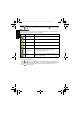
Icon Mode Description
Super Fine Best image quality with the lowest compression rate. File size is
the largest.
Fine Better image quality with medium compression rate. File size is
medium.
Normal Good image quality with the highest compression rate. File size
is the smallest.
W1220_UM - EN.book Page 11 Thursday, December 10, 2009 11:43 AM