
Operation Manual



2 Touring the camera
English
Camera
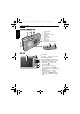
Front view and bottom view
Rear view
1. Shutter button
2. Flash
3. Power button
4. Self-timer LED indicator
5. Speaker
6. USB / AV port
7. Strap eyelet
8. Lens
9. Microphone
10. Tripod mount
11. Battery / Memory card cover
1. LCD display
2.
• Up: T (Tele) - Zoom-in or turn on the
Shooting mode description
• Down: W (Wide) - Zoom-out, turn off
the Shooting mode description, or enter
the thumbnail view (Playback mode)
3. MENU button or return to the
previous menu
4. Function (Fn) / Delete button -
Activate the function menu (Capture
mode) or delete photos (Playback mode)
5. Status LED
6. Multifunctional buttons (including a
4-way control and a button)
7. Mode switch - Toggle among Capture
(photo), Capture (movie), and Playback
modes
W1220_UM - EN.book Page 2 Thursday, December 10, 2009 11:43 AM